Summary
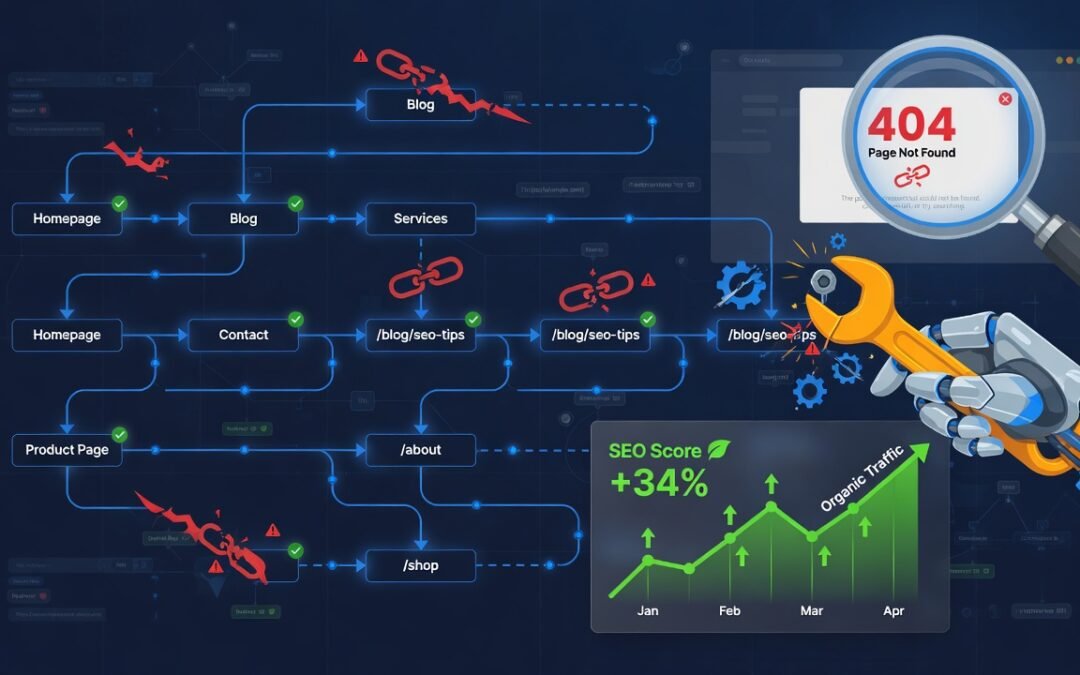
Broken internal links are silent killers of SEO performance. They disrupt crawl paths, bleed link equity, frustrate users, and send damaging signals to search engines like Google. This comprehensive guide Fix Broken Internal Links & Save SEO Equity walks you through everything — from identifying broken links using the right tools to implementing permanent redirects, rebuilding your internal link architecture, and preserving every drop of PageRank you’ve worked hard to earn. Whether you’re managing a small business website or a large e-commerce platform, this step-by-step playbook gives you a clear, actionable framework to fix broken internal links without losing a single ounce of SEO equity.
Table of Contents
- What Are Broken Internal Links and Why Do They Happen?
- How Broken Internal Links Damage Your SEO
- Tools to Audit and Identify Broken Internal Links
- Step-by-Step Process to Fix Broken Internal Links
- Implementing 301 Redirects Without Losing Link Juice
- Rebuilding Your Internal Linking Architecture the Right Way
- How to Prevent Broken Internal Links in the Future
- Broken Internal Links vs. Broken External Links: Key Differences
- Advanced Tips: Preserving SEO Equity at Scale
- Conclusion
What Are Broken Internal Links and Why Do They Happen?
In the world of search engine optimization, internal links are the connective tissue of your website. They guide both users and search engine crawlers from one page to another within the same domain. When those links break, that connective tissue tears — and the consequences can ripple across your entire SEO strategy.
A broken internal link is any hyperlink on your website that points to a destination URL that no longer exists, has been moved, or returns an HTTP error — most commonly a 404 Not Found error. From a technical SEO standpoint, this is one of the most damaging yet frequently overlooked issues in website maintenance.
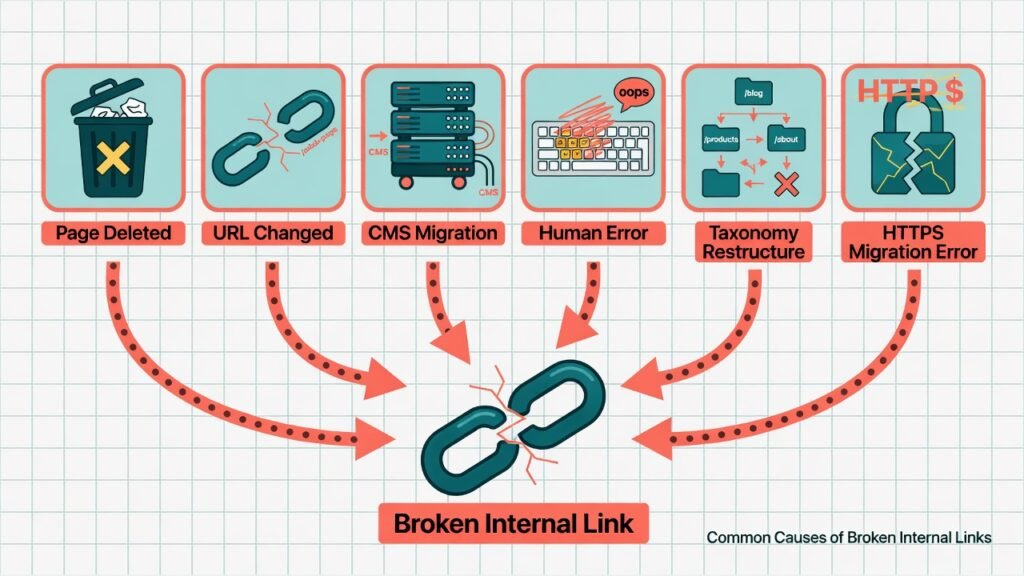
Common Causes of Broken Internal Links
Broken internal links don’t appear out of nowhere. They typically result from:
Page Deletions Without Redirects: When a webpage is removed — a discontinued product page, an outdated blog post, or a landing page from a past campaign — all internal links pointing to it instantly become dead ends. Without a proper 301 redirect, users and crawlers hit a wall.
URL Structure Changes: Changing your permalink structure (e.g., from /blog/post-name to /articles/post-name) breaks every link that used the old URL format. This is especially common after CMS migrations or SEO-driven URL restructuring.
CMS Platform Migrations: Moving from WordPress to Webflow, or from Magento to Shopify, often results in hundreds — sometimes thousands — of broken internal links due to changed URL formats, slug differences, or directory restructuring.
Manual Typos During Content Creation: Human error during content publishing — a mistyped slug, a copied-and-pasted URL from a staging environment, or a wrong relative path — creates broken links that can sit undetected for months.
Category and Tag Reorganizations: Restructuring your content taxonomy by merging, renaming, or deleting categories and tags breaks all links that referenced those old taxonomy URLs.
HTTPS Migrations Done Incorrectly: Migrating from HTTP to HTTPS without updating internal links leads to mixed-content issues and unnecessary redirect chains, both of which dilute link equity.
Understanding why broken internal links form is the first step toward building a proactive, long-term fix strategy rather than playing endless whack-a-mole with 404 errors.
How Broken Internal Links Damage Your SEO
This is where the stakes become critically clear. Broken internal links don’t just create a bad user experience — they actively undermine your search engine rankings, crawl efficiency, and PageRank flow. Let’s break down the full impact.
1. Crawl Budget Wastage
Search engine crawlers like Googlebot operate with a finite crawl budget allocated per domain per day. When your site has numerous broken internal links, Googlebot wastes precious crawl budget trying to access non-existent pages, leaving your important — and newly published — pages undiscovered and unindexed. This problem is especially critical for large websites with thousands of pages.
2. Disrupted PageRank Flow and Link Equity Loss
PageRank (or link equity) flows through your website via internal links. When a link points to a dead page, that equity transfer stops completely. Instead of channeling authority from your high-performing pages to your money pages or conversion-focused content, that link juice simply evaporates. Over time, this creates authority silos — isolated clusters of pages that never receive the internal equity they deserve.
If you’ve ever wondered why your Duplicate Content Is Hurting Your Rankings and broken links are co-existing on your site, it’s because both issues fragment your site’s authority and confuse search engines simultaneously.
3. Negative User Experience Signals
Google’s ranking algorithm places significant weight on user experience signals — including bounce rate, dwell time, and user engagement. When visitors click an internal link and land on a 404 error page, they’re far more likely to leave immediately. This spike in bounce rate from internal navigation sends a strong negative signal to Google about your site’s quality and reliability.
4. Orphaned Pages and Index Coverage Issues
Broken internal links can effectively orphan important pages — cutting them off from your site’s crawl path entirely. An orphaned page with zero internal links pointing to it is essentially invisible to Googlebot unless it’s explicitly submitted in a sitemap. Even then, without contextual link signals, Google struggles to understand the page’s relevance and topical authority.
5. Trust and Authority Erosion
From Google’s perspective, a website with numerous broken internal links signals poor site quality and low editorial standards. This is particularly damaging for sites attempting to rank for competitive keywords, where Google’s E-E-A-T (Experience, Expertise, Authoritativeness, Trustworthiness) framework applies strict quality assessments. If your website has recently been impacted and you suspect deeper issues, it may be worth investigating whether Google Deindexed Your Website Overnight — broken link infrastructure is often a contributing factor.
Tools to Audit and Identify Broken Internal Links
Before you can fix broken internal links, you need a reliable audit. Here are the most powerful tools used by SEO professionals:
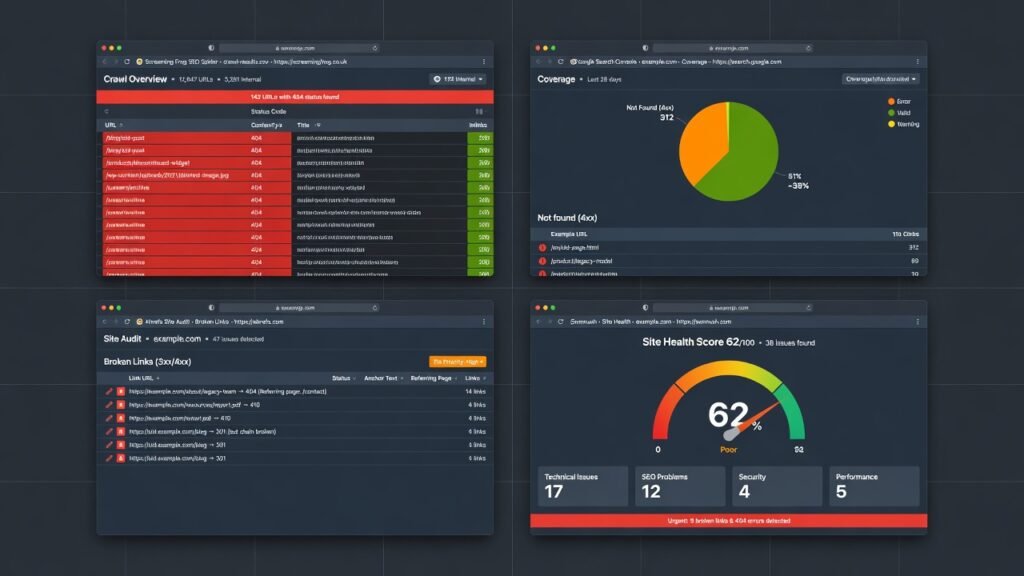
Screaming Frog SEO Spider
Screaming Frog is the gold standard for technical SEO audits. It crawls your entire website just like Googlebot and produces a detailed report of all broken links, their source pages, and their HTTP status codes. Filter by Response Code > 4xx to isolate all broken internal links instantly.
How to use it: Set the crawler to your domain, run a full crawl, navigate to Response Codes > Client Error (4xx) > Inlinks to see exactly which pages contain the broken links and which URLs are the broken destinations.
Google Search Console (GSC)
GSC’s Coverage Report and Crawl Stats section reveal which URLs are returning errors. The Pages > Not Indexed > Not Found (404) filter specifically highlights broken destination URLs that Googlebot has discovered through your internal linking structure.
Ahrefs Site Audit
Ahrefs Site Audit provides a comprehensive broken link report within its Internal Pages section. It also shows the number of internal links pointing to each broken page — invaluable for prioritizing which broken links to fix first based on equity impact.
Semrush Site Audit
Semrush flags broken internal links under its Errors category and also identifies redirect chains and redirect loops that silently siphon link equity even when a destination technically “exists.”
Google Analytics + Behavior Flow
While not a dedicated link audit tool, Google Analytics’ Behavior Flow report can reveal 404 pages that are receiving internal traffic — meaning real users are hitting broken links, not just crawlers.
Step-by-Step Process to Fix Broken Internal Links
Now that you’ve identified broken links, here’s a battle-tested, systematic process to resolve them without losing SEO equity.
Step 1: Export and Categorize All Broken Links
Export your audit results into a spreadsheet. Create three columns:
- Broken URL (the dead destination)
- Source Page (where the broken link lives)
- Priority Score (based on the number of internal links pointing to it and the source page’s authority)
Prioritize broken links on high-authority pages and those pointing to pages that were previously strong performers in organic search.
Step 2: Determine the Right Fix for Each Broken Link
Not all broken links are fixed the same way. There are three primary resolution paths:
Option A — Update the Link URL Directly: If the target page simply moved to a new URL, update the href attribute in the source page’s HTML to point to the new, correct URL. This is the cleanest fix and preserves full link equity with zero redirect overhead.
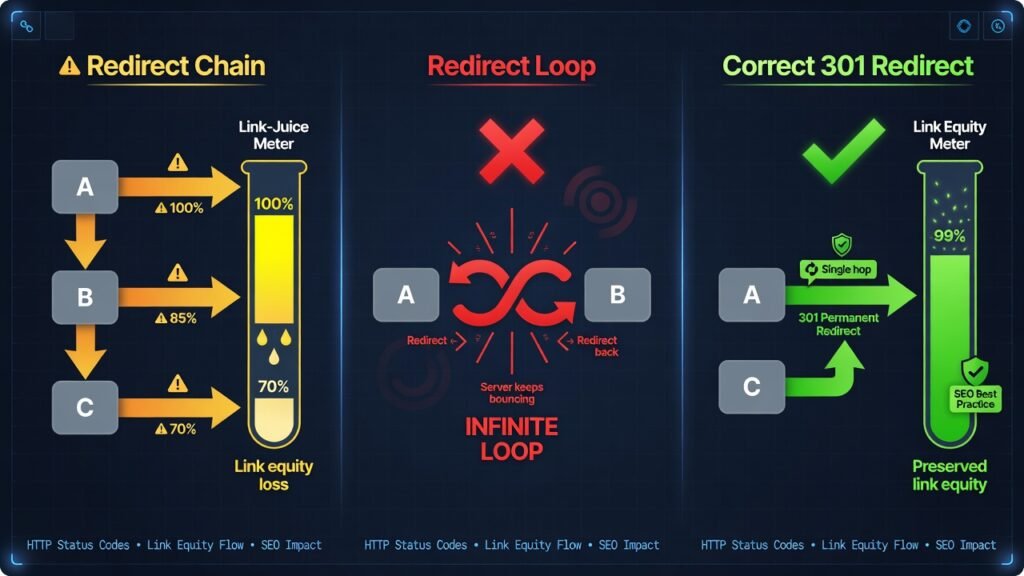
Option B — Implement a 301 Permanent Redirect: If the target page was deleted or moved and you cannot update the source page immediately (e.g., it’s a high-traffic page undergoing review), implement a 301 redirect from the old broken URL to the most topically relevant existing page. A 301 redirect passes approximately 99% of link equity to the destination.
Option C — Restore or Recreate the Target Page: If the broken URL was a genuinely valuable piece of content that was accidentally deleted, consider recreating it. Check your Wayback Machine archive (web.archive.org) to recover the original content and rebuild the page at the same URL slug.
Step 3: Update Internal Links at the Source
After implementing redirects, go back and manually update the internal links at their source pages to point directly to the final destination URL. Redirect chains — where Link A → Old URL → 301 → New URL — still create minor equity loss and performance latency. Direct links are always superior to redirected ones.
Step 4: Validate All Fixes
After updating, re-run your Screaming Frog crawl or Ahrefs audit to confirm that all previously identified broken links now return a 200 OK status code. Cross-check in Google Search Console that the Coverage report’s 404 errors are resolving over subsequent crawl cycles.
Step 5: Submit Updated Sitemap
Once your broken link fixes are in place, submit an updated XML sitemap to Google Search Console to accelerate re-crawling and re-indexing of affected pages.
Implementing 301 Redirects Without Losing Link Juice
The 301 permanent redirect is your most powerful tool for broken link remediation — but only when implemented correctly. Here’s how to do it right across the most common platforms.
In WordPress (via Yoast SEO or Redirection Plugin)
The Redirection plugin for WordPress provides a user-friendly interface for creating and managing 301 redirects. Navigate to Tools > Redirection > Add New Redirect. Enter the old URL in the Source URL field and the new destination in the Target URL field, then select 301 – Moved Permanently.
In Apache Servers (via .htaccess)
Add the following to your .htaccess file:
Redirect 301 /old-page-slug/ https://www.yourdomain.com/new-page-slug/For bulk redirects:
RedirectMatch 301 ^/old-category/(.*)$ https://www.yourdomain.com/new-category/$1In Nginx Servers
Add to your Nginx configuration block:
rewrite ^/old-page-slug/$ https://www.yourdomain.com/new-page-slug/ permanent;In Shopify
Go to Online Store > Navigation > URL Redirects > Add URL Redirect. Shopify handles 301 redirects natively without code.
Critical 301 Redirect Rules for Maximum Link Equity Preservation
Avoid Redirect Chains: Never redirect A → B → C. Always redirect A → C directly. Each hop in a redirect chain causes progressive link equity decay.
Avoid Redirect Loops: A redirects to B, which redirects back to A. This causes crawl errors and zero equity transfer.
Match HTTP Protocol: Ensure redirects go from HTTP to HTTPS, not the reverse. A redirect from HTTPS to HTTP signals a security downgrade and confuses crawlers.
Redirect to Topically Relevant Pages: A 301 redirect to a completely unrelated page still transfers equity but provides no contextual relevance signal. Always redirect to the most semantically related available page.
Rebuilding Your Internal Linking Architecture the Right Way
Fixing broken links is only half the battle. To truly future-proof your SEO and maximize equity flow across your site, you need to rethink your internal linking architecture from the ground up.
The Pillar-Cluster Model for Internal Linking
The most effective internal link structure for modern SEO is the topic cluster model — also called the hub-and-spoke or pillar-cluster model. Here’s how it works:
Pillar Pages are comprehensive, authoritative pieces of content covering a broad topic (e.g., “Complete Guide to Technical SEO”). They act as the hub.
Cluster Pages are in-depth articles covering specific subtopics related to the pillar (e.g., “How to Fix Crawl Errors,” “Canonical Tags Explained,” “XML Sitemap Best Practices”). They link back to the pillar page and to each other where relevant.
This architecture creates dense, contextual internal link webs that channel link equity toward your most important pages and clearly communicate topical authority to search engines.
Anchor Text Optimization for Internal Links
Your anchor text — the clickable text of an internal link — is a powerful on-page SEO signal. Unlike external backlinks, you have 100% control over your internal anchor text, so use it strategically.
Best Practices:
- Use descriptive, keyword-rich anchor text that reflects the target page’s primary topic
- Avoid generic anchor text like “click here,” “read more,” or “this article.”
- Maintain anchor text diversity — don’t use identical anchor text for every internal link to the same page
- Use partial-match keywords alongside exact-match anchors to maintain naturalness
For example, if you’re building authority in digital marketing, linking to an SEO Services Agency with contextually relevant anchor text tells both users and search engines exactly what the destination page covers, reinforcing topical signals and boosting the target page’s relevance for that keyword.
Optimal Internal Link Depth: The 3-Click Rule
Every important page on your site should be accessible within three clicks from the homepage. Pages buried deeper than three clicks receive significantly less crawl attention and are treated as lower-priority by search algorithms. Conduct a crawl depth analysis (available in Screaming Frog and Ahrefs) and flatten your site’s architecture where necessary by adding strategic internal links from your navigation, sidebar, footer, or contextual content.
Contextual Internal Links vs. Navigational Internal Links
Not all internal links carry equal SEO weight. Contextual internal links — those embedded naturally within the body content of a page — are weighted more heavily by Google than navigational links in menus, footers, or sidebars. Prioritize building contextual links within high-authority content pieces to pass maximum equity to your target pages.
How to Prevent Broken Internal Links in the Future
Fixing existing broken links is a remediation effort. Building systems to prevent them from forming in the first place is where long-term SEO gains are locked in.
1. Implement a Pre-Publish Link Check Protocol
Before any page goes live on your website, run it through a link checker. Plugins like Broken Link Checker for WordPress automatically scan content on publication and flag any broken links before they affect live users or crawlers.
2. Set Up Automated Monitoring
Use tools like Ahrefs Alerts, Semrush Site Audit scheduling, or Dead Link Checker to run automated broken link scans on a weekly or monthly basis. Configure alerts to notify your SEO team the moment new broken links are detected.
3. Maintain a Redirect Management Log
Every time a page is deleted or its URL is changed, log the old URL and its redirect destination in a centralized spreadsheet or CMS redirect manager. This “redirect registry” becomes invaluable during future audits and site migrations. It also ensures that redirect chains never form accidentally.
4. Use Relative URLs Carefully
Absolute URLs (e.g., https://www.example.com/page/) are far more reliable for internal links than relative URLs (e.g., ../page/). Relative URL structures can break during site migrations, subfolder reorganizations, or HTTPS protocol changes. Standardize on absolute URLs for all internal links.
5. Define a URL Deprecation Policy
Establish a formal content governance policy that dictates what happens to every page that is sunset, merged, or replaced. The policy should mandate: (a) all existing internal links to the old URL are updated at the source, and (b) a 301 redirect is placed on the old URL pointing to the most relevant replacement. According to Google’s Search Central documentation, a permanent redirect is the recommended approach for all moved or deleted content to maintain crawl continuity and signal authority transfer.
Broken Internal Links vs. Broken External Links: Key Differences
Understanding the distinction between broken internal and external links is essential for prioritization and resolution strategy.
| Factor | Broken Internal Links | Broken External Links |
| Control | Full control — you own both ends | Partial control — you only own the linking page |
| SEO Impact | Disrupts crawl paths and PageRank flow on YOUR site | Signals poor outreach quality; less direct ranking impact |
| Fix Method | Harder to detect; requires a dedicated outbound link crawling | Remove or replace the outbound link; contact the linked site |
| Detection Speed | Quickly detected via site audits | Harder to detect; requires dedicated outbound link crawling |
| User Impact | Users remain on your domain but hit a dead end | Users leave your domain and hit an error on another site |
| Google’s Treatment | Active crawl budget waste and equity loss | Minor trust signal issue; less penalized than internal |
Both types matter for overall SEO health, but broken internal links should always be treated as the higher-priority issue due to their direct impact on crawlability, indexation, and PageRank flow within your own domain.
Advanced Tips: Preserving SEO Equity at Scale
For enterprise websites, large e-commerce platforms, or multi-language sites managing thousands of pages, advanced techniques are needed to protect SEO equity at scale.
Use Log File Analysis to Find Crawler-Discovered Broken Links
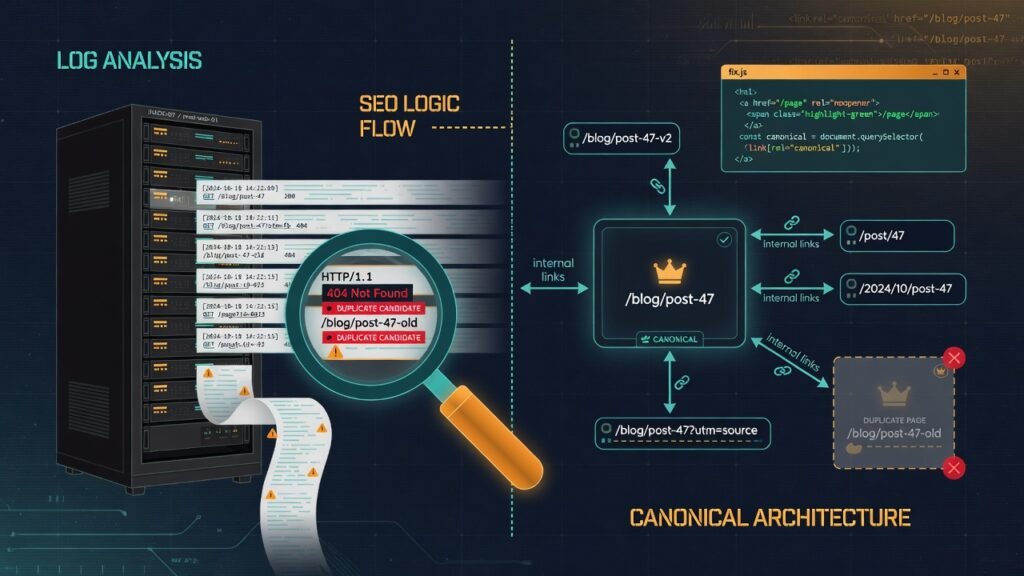
Your server log files contain a raw record of every URL Googlebot has attempted to crawl on your domain. Analyzing these logs with tools like Screaming Frog Log Analyzer or Splunk reveals broken links that Googlebot discovered organically — including those that don’t appear in your standard crawl because they’re linked from external sources or hidden deep within JavaScript-rendered content.
Canonicalization and Internal Links Work Together
If your site uses canonical tags to manage duplicate content, ensure that your internal links always point to the canonical version of a page — not to its duplicate or alternate variants. Sending internal links to non-canonical URLs sends confusing signals to Googlebot and contributes to equity fragmentation. Addressing both canonicalization and broken links simultaneously is critical — if you haven’t already, read about how Duplicate Content Is Hurting Your Rankings to understand the full scope of the issue.
JavaScript Internal Links: A Hidden Broken Link Risk
Modern websites built on React, Vue, or Angular frequently render internal links dynamically via JavaScript. Standard crawlers that don’t execute JavaScript will fail to discover these links entirely, creating invisible crawl gaps. Use Google’s URL Inspection Tool in Search Console and Rendered Page Reports in Screaming Frog (JavaScript rendering mode) to verify that all JavaScript-generated internal links are being discovered and are returning valid status codes.
Handle Pagination and Faceted Navigation Links Carefully
E-commerce sites with faceted navigation (filters by color, size, price) and paginated category pages generate enormous volumes of internal links. When filter combinations or pagination structures change, hundreds of internal links can break simultaneously. Implement a robust facet management strategy — either through canonical tags pointing to the main category page or through structured parameter handling in Google Search Console — to prevent this class of mass broken link events.
Conclusion
Broken internal links are far more than a housekeeping issue — they are active threats to your website’s crawlability, PageRank distribution, user experience, and organic search performance. Every 404 error reached through an internal link is a missed opportunity: a missed crawl, a missed equity transfer, a missed conversion.
The good news is that with the right audit tools, a disciplined redirect strategy, and a forward-looking internal link architecture, you can not only fix every broken internal link on your site — you can recover and even amplify the SEO equity that was previously being lost.
Here’s your action plan in a nutshell:
1. Audit Immediately: Run a full site crawl with Screaming Frog or Ahrefs to get a complete inventory of all broken internal links.
2. Prioritize by Impact: Fix broken links on high-authority pages and high-traffic pathways first.
3. Update Links at the Source: Where possible, update the href directly — it’s cleaner and faster than relying on redirects.
4. Implement 301 Redirects Strategically: Where direct link updates aren’t feasible, deploy clean, single-hop 301 redirects to the most topically relevant active page.
5. Rebuild Your Architecture: Use the pillar-cluster model to create a robust, interconnected internal linking framework that distributes authority efficiently.
6. Automate and Monitor: Set up recurring audits and pre-publication checks to prevent new broken links from forming.
7. Work With Experts: If the scale or complexity of your broken link issue exceeds your in-house capacity, partnering with an experienced SEO Services Agency can accelerate your recovery timeline and protect your organic rankings while you scale.
Your internal link health is a direct reflection of your site’s overall SEO quality. Invest the time to get it right, and the search engines — and your users — will reward you for it.