

Summary
URL parameters are one of the most overlooked yet most damaging technical SEO issues a website can face. When left unmanaged, they silently drain your crawl budget, generate thousands of duplicate URLs, and confuse search engine crawlers — pushing your most valuable pages out of the index. This article, How to Handle URL Parameter Issues Before They Wreck Your Crawl Budget, breaks down exactly what URL parameter problems look like, why they hurt your site’s crawl efficiency and indexability, and the precise, actionable steps you need to take to fix them before they cause lasting SEO damage.
Table of Contents
- What Are URL Parameters and Why Do They Matter for SEO?
- How URL Parameters Waste Your Crawl Budget
- Common Types of URL Parameter Problems
- How to Audit and Identify URL Parameter Issues
- Proven Methods to Handle URL Parameters for SEO
- Google Search Console and URL Parameter Configuration
- Canonical Tags: Your Safety Net for Duplicate URLs
- Robots.txt and Crawl Directives for Parameter URLs
- When to Use Noindex vs Canonical for Parameter Pages
- URL Parameter Best Practices Going Forward
- Conclusion
What Are URL Parameters and Why Do They Matter for SEO?
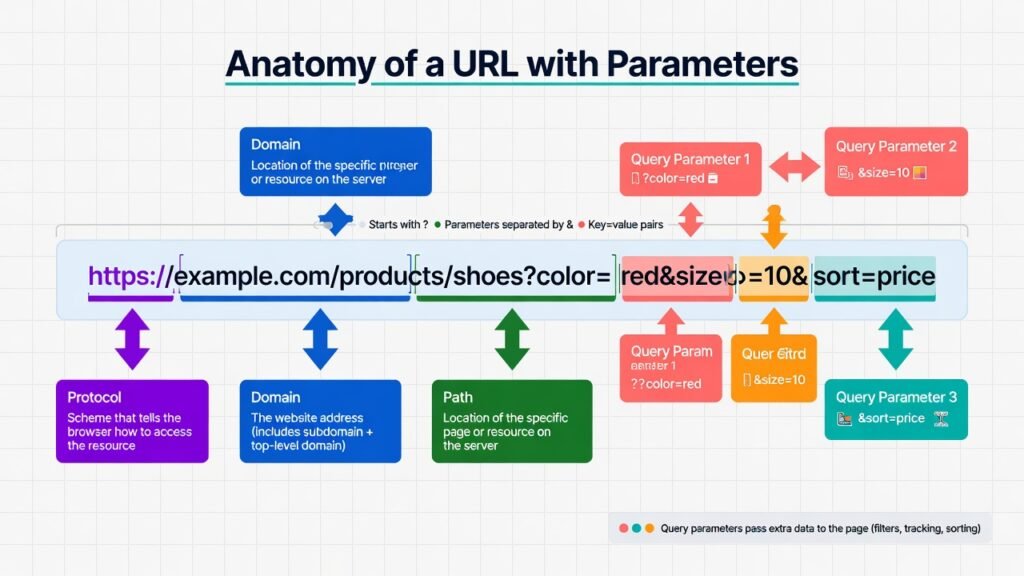
In the world of technical SEO, few culprits are as sneaky — or as destructive — as unmanaged URL parameters. A URL parameter (also called a query string) is any key-value pair appended to a URL after a question mark (?). They are typically added by websites to track sessions, filter products, sort listings, run A/B tests, manage affiliate traffic, or handle pagination.
For example:
- https://example.com/shoes?color=red&size=10
- https://example.com/blog?page=3&sort=newest
- https://example.com/product?ref=email&utm_source=newsletter
From a user experience perspective, these URLs serve clear functions. But from a search engine crawler’s standpoint, each unique URL string represents a potentially new page to discover, crawl, and evaluate. And that’s where the problem begins.
Search engines like Google use automated bots — commonly referred to as Googlebot or web spiders — to systematically crawl the internet and discover content. These bots don’t have unlimited time or resources to spend on any single website. Google allocates each site a finite amount of crawling attention known as the crawl budget, and URL parameters are one of the fastest ways to burn through it.
How URL Parameters Waste Your Crawl Budget
Crawl budget is the number of URLs a search engine will crawl on your site within a given timeframe. Google has officially acknowledged that crawl budget is a critical concern for large websites, e-commerce platforms, and any site with dynamic content generation.
When URL parameters go unmanaged, here’s what happens step by step:
Crawl budget dilution occurs when Googlebot spends its limited crawl quota visiting hundreds — or thousands — of parameter-based URL variations that are essentially duplicates of the same page. Instead of crawling your fresh blog posts, new product pages, or recently updated landing pages, the bot is burning resources on /shoes?color=red, /shoes?color=blue, /shoes?color=green, and so on indefinitely.
Index bloat is the downstream consequence. When duplicate or near-duplicate parameter URLs get indexed, they crowd your search engine index with low-value pages. This dilutes your site’s topical authority and makes it harder for Google to identify your canonical, authoritative content.
Ranking signal fragmentation happens when external backlinks and internal links point to different URL variations of the same page. Instead of consolidating PageRank and link equity to one strong URL, authority gets scattered across multiple thin parameter variants — weakening all of them.
According to Google’s own documentation on crawl budget management, URL parameters are explicitly listed among the most significant causes of crawl budget waste. Google recommends proactive management of parameter handling as a fundamental component of enterprise-level technical SEO.
Common Types of URL Parameter Problems
Understanding what type of parameters you’re dealing with is the first step toward fixing them. There are several distinct categories of problematic parameter behavior.
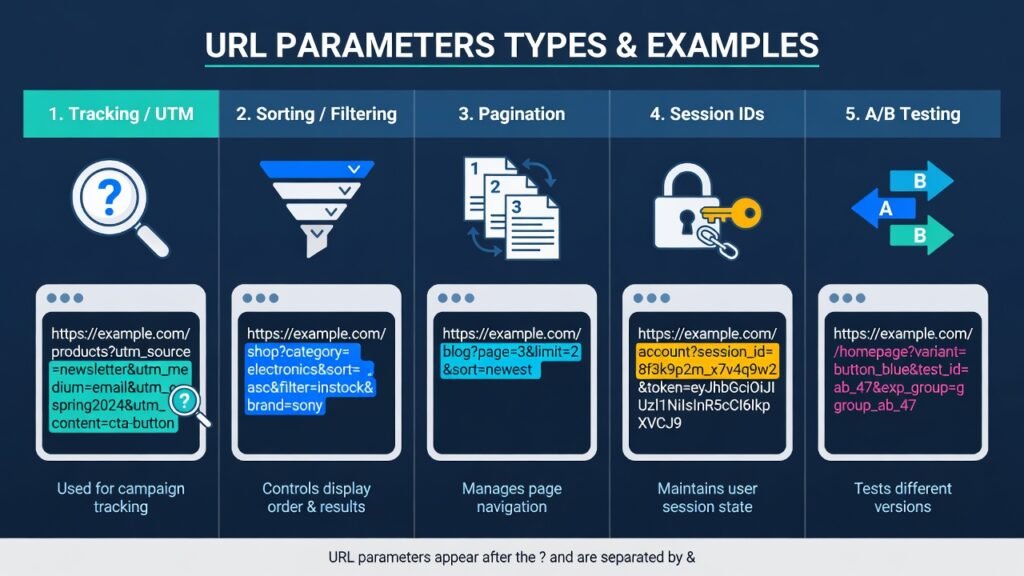
Tracking and Analytics Parameters
UTM parameters — utm_source, utm_medium, utm_campaign, utm_content, utm_term — are added by marketers to track campaign performance in tools like Google Analytics. While completely harmless for analytics, they create infinite URL variants from a crawling perspective. A page promoted via email, social media, and paid ads can instantly generate dozens of trackable URLs that all serve identical content.
Sorting and Filtering Parameters
E-commerce websites are the biggest sufferers here. Product category pages with filtering options — size, color, price range, brand, rating — can generate an astronomical number of URL combinations. A category with just five filter types, each with five options, can mathematically produce thousands of unique parameter URLs, all serving nearly identical content with slight product-set differences.
Pagination Parameters
Parameters like ?page=2, ?p=5, or ?offset=20 are used for paginating content across multiple pages. While pagination itself is legitimate and necessary, mishandled pagination parameters can cause Googlebot to crawl deep, low-value paginated pages while ignoring fresher, more important content.
Session and User-Specific Parameters
Session IDs like ?sessionid=abc123xyz are dynamic values unique to each visitor session. Every user generates a completely unique URL, which can create an effectively infinite number of crawlable URLs on a site. Search engines have grown better at recognizing these, but they still pose significant crawl waste risks.
A/B Testing and Personalization Parameters
Parameters used for split testing (?variant=B, ?test=v2) or personalization can create parallel URL structures that search engines treat as separate pages, leading to content duplication at scale.
How to Audit and Identify URL Parameter Issues
Before you can fix URL parameter problems, you need a clear picture of what’s happening on your site. A proper technical SEO audit targeting parameter issues involves several diagnostic steps.
Step 1: Crawl Your Website with a Dedicated Tool
Use a site crawler such as Screaming Frog SEO Spider, Sitebulb, or Ahrefs Site Audit to crawl your entire domain. Configure the crawler to follow all URLs, including those with query strings. Export the full list of crawled URLs and filter for any containing a ? character — this is your raw parameter URL inventory.
Step 2: Analyze Google Search Console Coverage Report
Inside Google Search Console, navigate to the Coverage report and examine both the “Indexed” and “Excluded” tabs. Look for large numbers of URLs that are marked as “Duplicate, Google chose a different canonical than the user” or “Excluded by noindex.” These are strong signals that parameter URLs are being discovered, indexed, and causing duplication conflicts.
Step 3: Check Your Log Files
Server log file analysis is arguably the most authoritative way to understand Googlebot’s crawling behavior. Tools like Screaming Frog Log File Analyser, Semrush Log File Analyser, or custom scripts can parse your server logs to reveal which URLs Googlebot is actually visiting, how frequently, and what proportion are parameter-based. If 60% of Googlebot’s visits are to parameter URLs, you have a serious crawl budget problem.
Step 4: Cross-Reference Index Size
Compare your site’s total page count (from your CMS or sitemap) against the number of pages Google has indexed (visible via a site:yourdomain.com search or Search Console). A massive discrepancy — where Google has indexed far more URLs than you have real pages — is a definitive signal of parameter-driven index bloat.
If you’re also dealing with broken links eroding your SEO equity alongside parameter issues, be sure to read our guide on how to Fix Broken Internal Links Without Losing SEO Equity for a comprehensive technical cleanup strategy.
Proven Methods to Handle URL Parameters for SEO
Once you’ve identified the scope of the problem, it’s time to implement solutions. There is no single universal fix — the right approach depends on what the parameter does and how it affects page content.
Method 1: Implement Self-Referencing Canonical Tags
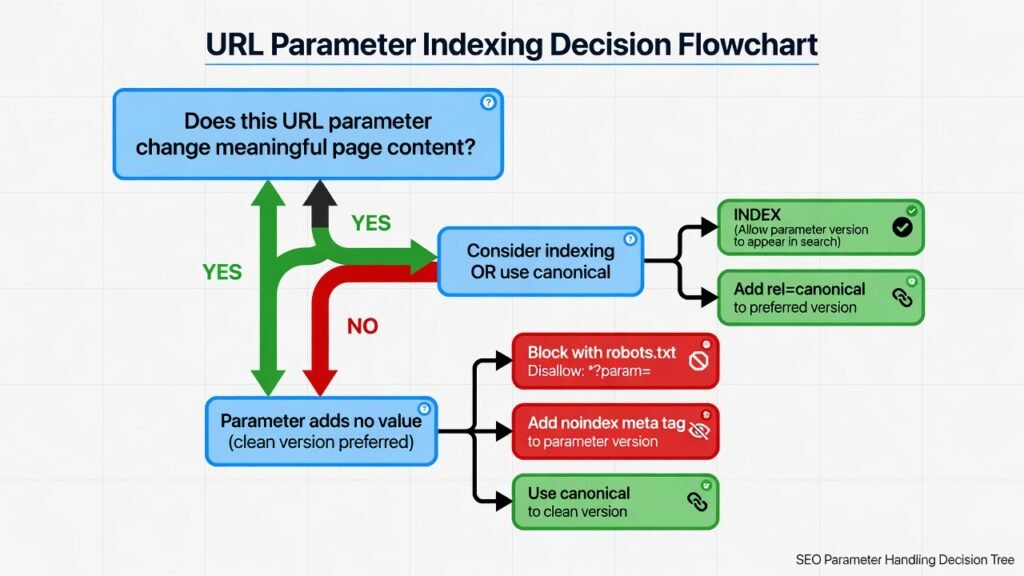
The canonical tag (<link rel=”canonical” href=”…”>) is the most widely applicable solution for parameter-generated duplicates. By adding a canonical tag on every parameter URL that points back to the clean, preferred version of the page, you signal to search engines that the parameter URL is a variant — not an independent page.
For example, on the URL /shoes?color=red&size=10, the canonical tag should point to /shoes (or whichever URL you designate as the canonical version). This consolidates link equity, prevents index bloat, and guides Googlebot toward your preferred content.
Method 2: Use Robots.txt Disallow Rules
For parameters that generate truly useless content from an SEO standpoint — such as session IDs, internal tracking codes, or print-version parameters — you can block Googlebot from crawling those URL patterns entirely using robots.txt. This is most effective when the parameters follow predictable patterns.
Example robots.txt directive:
User-agent: Googlebot

Disallow: /*?sessionid=

Disallow: /*?print=
Caution: Blocking via robots.txt prevents crawling but does not prevent indexing if external links point to those URLs. For full control, combine robots.txt with canonical tags or noindex directives.
Method 3: Configure URL Parameters in Google Search Console
Google Search Console’s legacy URL Parameters tool (under Legacy Tools) allows you to explicitly tell Google how specific parameters should be treated — whether they change page content, duplicate it, or should be ignored entirely. While Google has deprecated some of this functionality in favor of relying on canonical tags, it can still be useful for directing Googlebot’s behavior on complex parameter structures.
Method 4: Rewrite URLs with Faceted Navigation Solutions
For e-commerce sites with complex filtering systems, the most robust long-term solution is implementing faceted navigation SEO best practices. This involves deciding which filter combinations deserve their own indexable pages (those with strong search demand) and noindexing or canonicalizing all others. Tools like Botify, OnCrawl, or custom server-side logic can help manage this at scale.
Google Search Console and URL Parameter Configuration
Even with Google’s evolution toward trusting canonical signals more than manual configuration, Search Console remains a vital diagnostic hub for managing URL parameters. Within the Coverage and URL Inspection tools, you can observe which version of a URL Google is actually indexing and whether your canonical directives are being respected.
Use the URL Inspection tool to test individual parameter URLs. It will show you whether Google treats the URL as canonical or recognizes a different canonical you’ve specified. If Google is consistently overriding your canonical tags with a different URL, it’s a sign of conflicting signals — such as sitemaps including parameter URLs, or internal links pointing primarily to parameter versions.
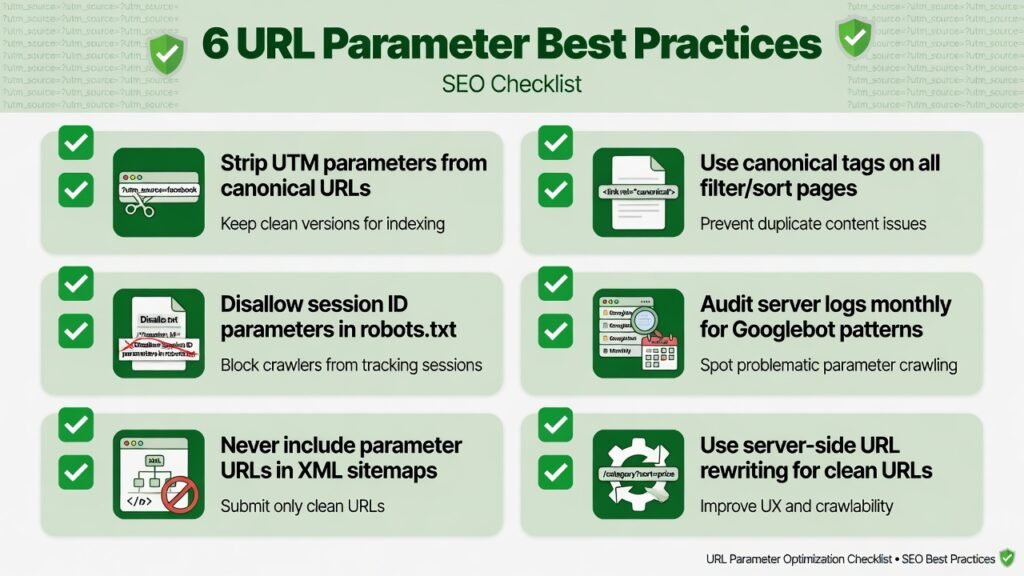
Key rule: Never include parameter URLs in your XML sitemap unless those pages represent genuinely unique, high-value content. Sitemaps communicate to Google that the included URLs are your priority pages — including parameter variants sends contradictory signals.
Canonical Tags: Your Safety Net for Duplicate URLs
The canonical tag deserves its own dedicated focus because it is the most nuanced and powerful tool in your URL parameter arsenal. Implemented correctly, it allows Googlebot to discover, crawl, and even render parameter-based pages while clearly communicating that a clean URL is the authoritative version.
Absolute vs. Relative Canonical URLs
Always use absolute canonical URLs (including the full protocol and domain) rather than relative paths. Relative canonical tags can be misinterpreted in certain server environments, leading to unintended consequences.
✅ Correct:
<link rel="canonical" href="https://example.com/shoes"> ❌ Incorrect: <link rel="canonical" href="/shoes">Dynamic Canonical Tag Implementation
For large, dynamically generated websites, canonical tags should be programmatically generated at the server or CMS level. Platforms like WordPress, Shopify, and Magento have built-in canonical tag support or plugins/extensions (such as Yoast SEO or Rank Math for WordPress) that can handle this automatically.
Ensure your development team sets canonical tags server-side rather than injecting them via JavaScript — crawler-rendered canonical tags loaded asynchronously may not be reliably processed.
Robots.txt and Crawl Directives for Parameter URLs
Your robots.txt file is the gatekeeper for what search engine crawlers are allowed to access. When used strategically for URL parameter management, it can dramatically reduce crawl waste. However, it requires careful implementation to avoid accidentally blocking important content.
The safest approach is to use wildcard patterns (*) in Disallow rules to block entire parameter categories:
User-agent: *

Disallow: /*?*sort=

Disallow: /*?*session=

Disallow: /*?*ref=
Monitor your robots.txt changes using Google Search Console’s robots.txt tester and watch your Crawl Stats report (under Settings) to verify that Googlebot’s crawl activity shifts away from parameter URLs and toward your core content pages after implementation.
When to Use Noindex vs. Canonical for Parameter Pages
Both noindex and canonical tags signal that a page is not the primary version — but they work differently, and choosing the wrong one can cause problems.
Use canonical when: The parameter page has a value for users but is a duplicate of another page. You want link equity from external sources pointing to the parameter URL to flow to the canonical. The page should remain crawlable so Googlebot can follow and pass signals.
Use noindex when: The parameter page is genuinely useless for any user or SEO purpose (e.g., session ID pages, print pages, internal search results with no organic value). You want to prevent the page from appearing in search results entirely. Note that noindex does not prevent crawling — Google may still visit the page.
Critical warning: Do not combine noindex with disallow in robots.txt for the same URL. If Googlebot is blocked from crawling a page, it cannot read the noindex directive — and may index the page based on external signals alone.
URL Parameter Best Practices Going Forward
Prevention is always better than remediation. Establishing clear URL parameter governance from the outset — or retrofitting it now — will protect your crawl budget indefinitely.
Standardize UTM parameter stripping by configuring your analytics platform to track campaigns via first-party data or by using URL shorteners that redirect to clean URLs. Google Analytics 4 supports measurement protocol and server-side tracking as alternatives to query-string-based attribution.
Implement parameter whitelisting on your CMS or server configuration. Instead of allowing any parameter to generate a unique crawlable URL, define an explicit whitelist of parameters that are permitted — and strip or redirect all others to the clean URL.
Use URL rewriting at the server level (via .htaccess on Apache or nginx.conf on Nginx) to convert parameter-based filtering into clean, path-based URLs. For example, converting /shoes?color=red to /shoes/red/ creates crawlable, indexable URLs that look like intentional content rather than query string accidents.
Audit quarterly. URL parameter sprawl tends to re-emerge over time as marketing teams add new tracking codes, developers introduce new filtering features, and third-party tools append their own query strings. Build a regular audit cadence into your SEO workflow.
For a complete overview of how our technical SEO services can help you manage crawl budget and site architecture at scale, visit our Pricing Plan for SEO Services to find a plan that fits your site’s needs.
Conclusion
URL parameter issues are a silent but severe threat to your website’s search engine performance. Left unchecked, they systematically drain your crawl budget, bloat your search index with duplicate content, fragment your link equity, and push your genuinely valuable pages further from Google’s attention.
The good news is that these problems are entirely fixable — and preventable — with the right technical SEO strategy. By auditing your parameter landscape, implementing canonical tags correctly, configuring robots.txt disallow rules strategically, removing parameter URLs from your XML sitemaps, and establishing ongoing governance processes, you can reclaim your crawl budget and direct search engine attention where it matters most.
Technical SEO is not a one-time project — it is an ongoing discipline. The websites that consistently outperform their competitors in organic search are those that treat crawl budget, URL architecture, and indexation health as core infrastructure concerns, not afterthoughts.
Start your audit today. Identify your worst-offending parameters. Apply the fixes methodically. And then monitor your crawl stats, index coverage, and organic rankings over the coming weeks to watch the results compound.
Your crawl budget is finite. Make every URL count.