Summary
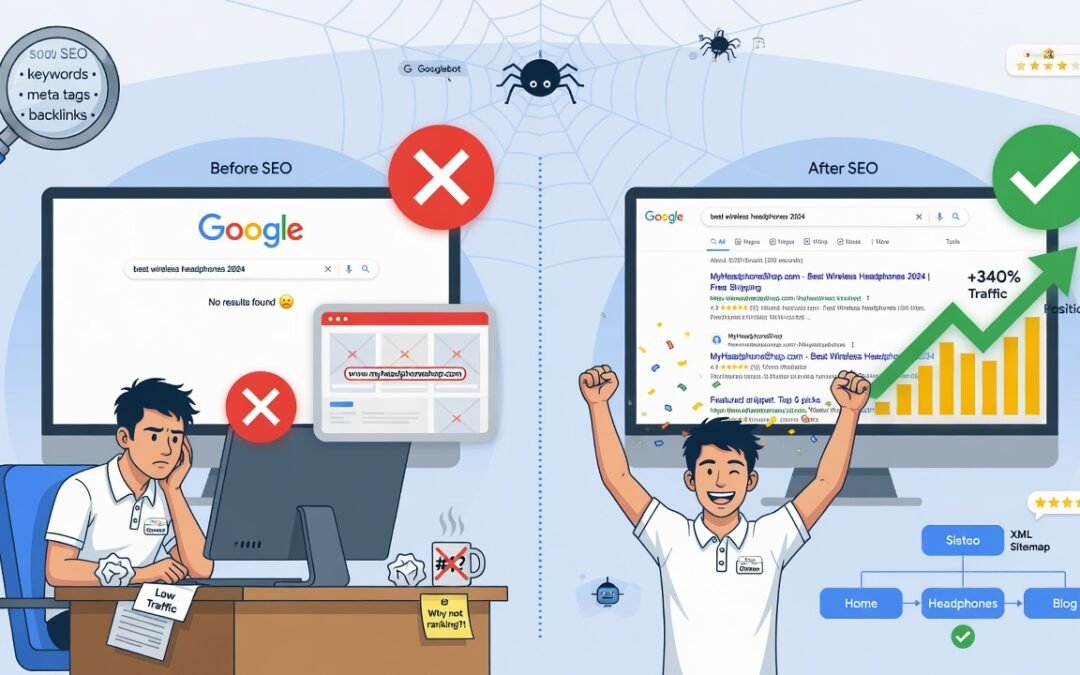
If your Website Not Showing on Google search results, you are not alone. Thousands of website owners face this exact problem every day — whether they just launched a new site or noticed a sudden ranking drop on an established one. The reasons range from simple technical oversights like a misconfigured robots.txt file to more serious issues like a Google manual action penalty. This in-depth guide walks you through every possible reason your website is invisible on Google and gives you actionable, step-by-step fixes to get your site indexed and ranking fast.
Table of Contents
- How Google Discovers and Indexes Websites
- Top Reasons Your Website Is Not Showing on Google
- How to Check If Your Website Is on Google
- Step-by-Step Fixes to Get Your Website on Google
- How Long Does It Take to Appear on Google?
- When to Hire an SEO Agency
- Conclusion
- Meta Title & Meta Description
How Google Discovers and Indexes Websites
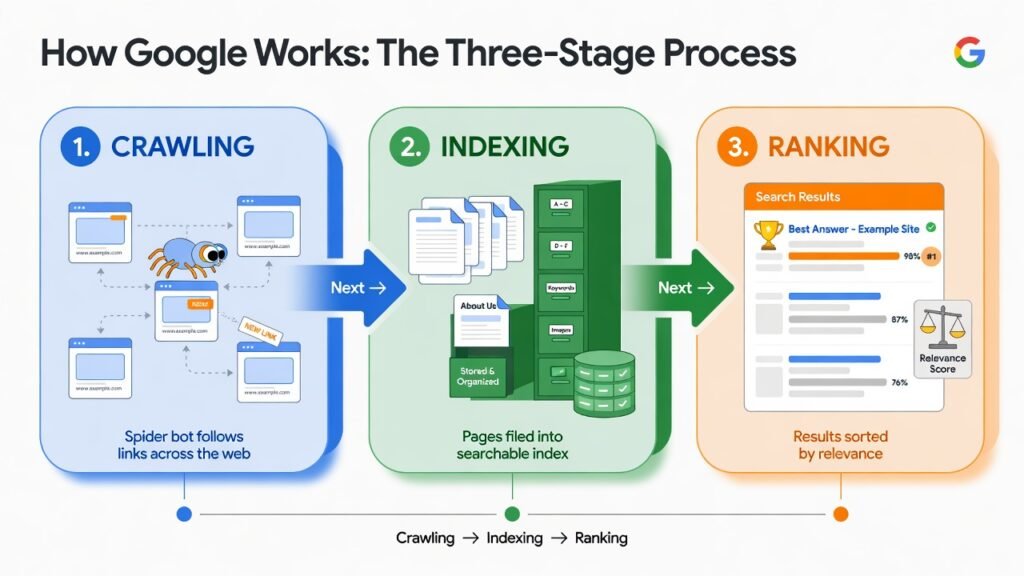
Before diving into the problems, it is essential to understand how search engines work. Google uses automated programs called Googlebot (also known as web crawlers or spiders) to continuously browse the internet. These bots follow links from page to page, collect data about each URL, and send that information back to Google’s index — a massive database of all known web pages.
When someone performs a search query, Google’s search algorithm (including core systems like RankBrain, Helpful Content System, and PageRank) scans this index and delivers the most relevant, authoritative results on the Search Engine Results Page (SERP).
If your website is missing from this process at any stage — discovery, crawling, indexing, or ranking — it will simply not show up for any search terms, no matter how well-optimized your content may be.
Top Reasons Your Website Is Not Showing on Google
1. Your Website Is New and Not Yet Indexed
One of the most common reasons is simply that your website is brand new. Google does not instantly know a website exists. Googlebot needs to first discover your site — typically through an external backlink or a submitted sitemap — and then crawl and index it.
Fix: Submit your website manually to Google via Google Search Console. Navigate to the URL Inspection tool, enter your homepage URL, and click “Request Indexing.” Also, submit your XML sitemap under the Sitemaps section.
2. Robots.txt Is Blocking Googlebot
Your robots.txt file is a text file that tells search engine crawlers which pages or sections of your site they are allowed or not allowed to visit. A simple misconfiguration here can accidentally block Google from crawling your entire website.
How to check: Visit yourdomain.com/robots.txt and look for lines like:
User-agent: *
Disallow: /
This single command blocks ALL crawlers from your entire site.
Fix: Remove or update the Disallow directive. The correct robots.txt for a fully crawlable site should read:
User-agent: *
Disallow:
You can also use Google Search Console’s Robots.txt Tester to validate your file before publishing changes.
3. Noindex Meta Tag Is Accidentally Applied
A noindex meta tag in your page’s HTML header explicitly tells Google not to index that page. Developers often add this during a website build or staging phase and forget to remove it before going live.
How to check: Right-click any page → View Page Source → search for noindex. You might find:
html
<meta name=”robots” content=”noindex, nofollow”>
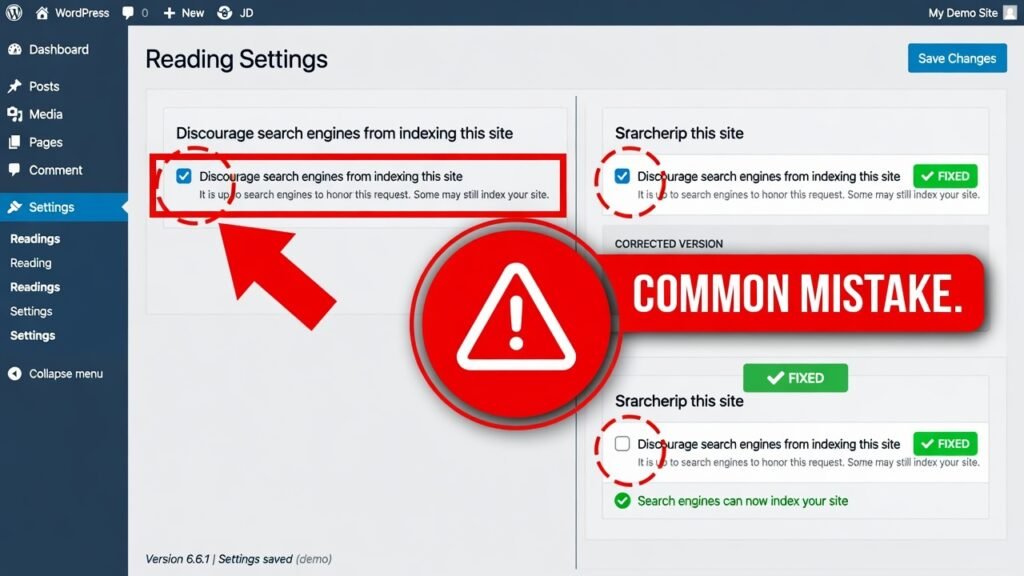
Fix: Remove this tag from all public-facing pages. In WordPress, check Settings → Reading and make sure “Discourage search engines from indexing this site” is unchecked. In Yoast SEO or Rank Math, verify that no-index is not toggled on.
4. Your Website Has No Backlinks or Domain Authority
Even if your site is indexed, it may not rank because Google has no reason to trust or surface it. Backlinks — links from other websites pointing to yours — act as votes of confidence in Google’s eyes. A brand-new website with zero backlinks has no domain authority (DA), domain rating (DR), or PageRank signal, meaning it competes poorly against established websites.
Fix: Begin a structured link-building strategy. Start by:
- Submitting your website to high-authority directories (Google Business Profile, Bing Places, Yelp)
- Getting listed on industry-relevant sites and niche platforms
- Publishing shareable content that naturally earns backlinks
- Writing guest posts on authoritative blogs in your niche
5. Google Search Console Is Not Set Up or Verified
Google Search Console (GSC) is the primary communication channel between your website and Google. Without it, you are flying blind. You cannot see indexing errors, manual actions, search performance data, or coverage issues.
Fix: Go to Google Search Console and add your property. Verify ownership via HTML tag, DNS record, or Google Analytics. Once verified, submit your sitemap and monitor the Coverage report regularly.
6. Crawl Errors and a Broken XML Sitemap
If your XML sitemap contains broken URLs, redirects, or non-canonical pages, Google wastes valuable crawl budget on low-quality URLs and fails to discover your important pages. 404 errors, redirect chains, and improperly formatted sitemaps are among the most overlooked technical SEO issues.
Fix:
- Validate your sitemap at yourdomain.com/sitemap.xml
- Use Screaming Frog SEO Spider or Ahrefs Site Audit to identify crawl errors
- Ensure your sitemap only includes canonical, indexable URLs
- Resubmit the corrected sitemap in Google Search Console
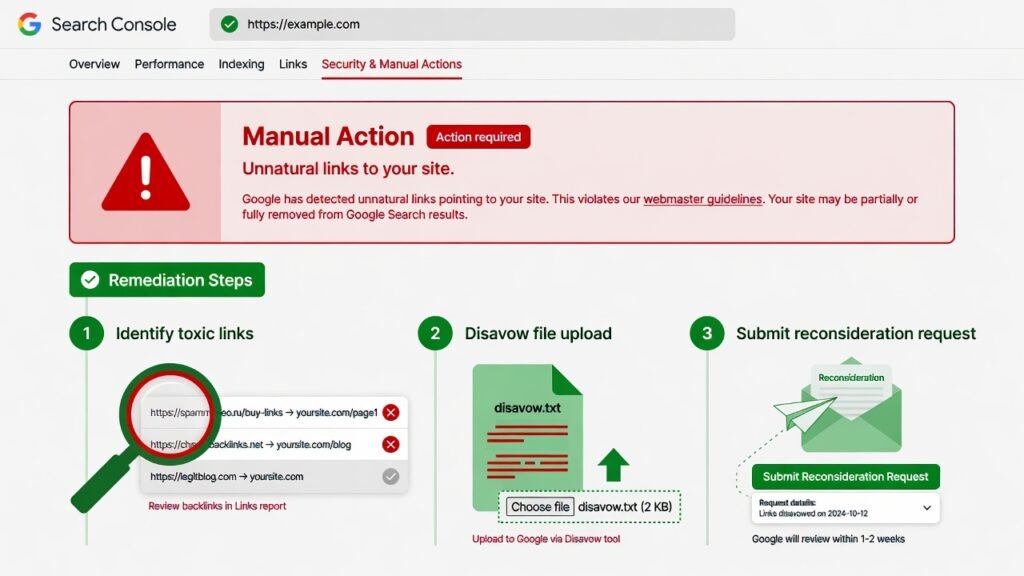
7. Google Has Applied a Manual Action (Penalty)
A Google manual action — also called a manual penalty — is issued by a human Google reviewer when your site violates Google’s Search Essentials (formerly Webmaster Guidelines). Common triggers include spammy backlinks, cloaking, thin content, hidden text, or participation in link schemes.
How to check: In Google Search Console, navigate to Security & Manual Actions → Manual Actions. If a penalty exists, it will be listed here with a description.
Fix: Carefully read the manual action description. Address every identified violation. For toxic backlink issues, use Google’s Disavow Tool. Once fixed, submit a Reconsideration Request through Search Console explaining what you found and what corrective actions you took.
8. Thin, Duplicate, or Low-Quality Content
Google’s Helpful Content System and Panda-era filters are designed to demote websites that contain thin content, duplicated material, or AI-generated text with no added value. If your pages offer nothing beyond what’s already widely available, Google has no incentive to rank them.
Fix:
- Audit your content using tools like Semrush Content Audit or Surfer SEO
- Merge or consolidate thin pages using 301 redirects
- Add original research, expert opinion, case studies, and helpful multimedia
- Ensure every page satisfies E-E-A-T (Experience, Expertise, Authoritativeness, Trustworthiness)
9. Your Website Lacks an HTTPS / SSL Certificate
Google confirmed HTTPS as a ranking signal back in 2014. Websites still running on HTTP are flagged as “Not Secure” in browsers and are at a significant disadvantage in search rankings. Many hosting environments also block Googlebot from accessing HTTP sites on certain configurations.
Fix: Install a free SSL certificate via Let’s Encrypt through your hosting provider’s cPanel or use a paid option for added features. After switching, update all internal links, set up 301 redirects from HTTP to HTTPS, and update your Google Search Console property to the HTTPS version.
10. JavaScript Rendering Issues
Modern websites built with JavaScript frameworks like React, Vue, or Angular can present serious indexing problems. Googlebot crawls in two waves — the first pass processes only raw HTML. JavaScript-rendered content may not be processed until the second indexing wave, which can take days or weeks. If critical content or internal links are loaded via JavaScript, Google may miss them entirely.
Fix: Implement Server-Side Rendering (SSR) or Static Site Generation (SSG) to pre-render pages. Use Google’s URL Inspection Tool to test how Googlebot renders your pages versus how they look in a browser.
How to Check If Your Website Is on Google
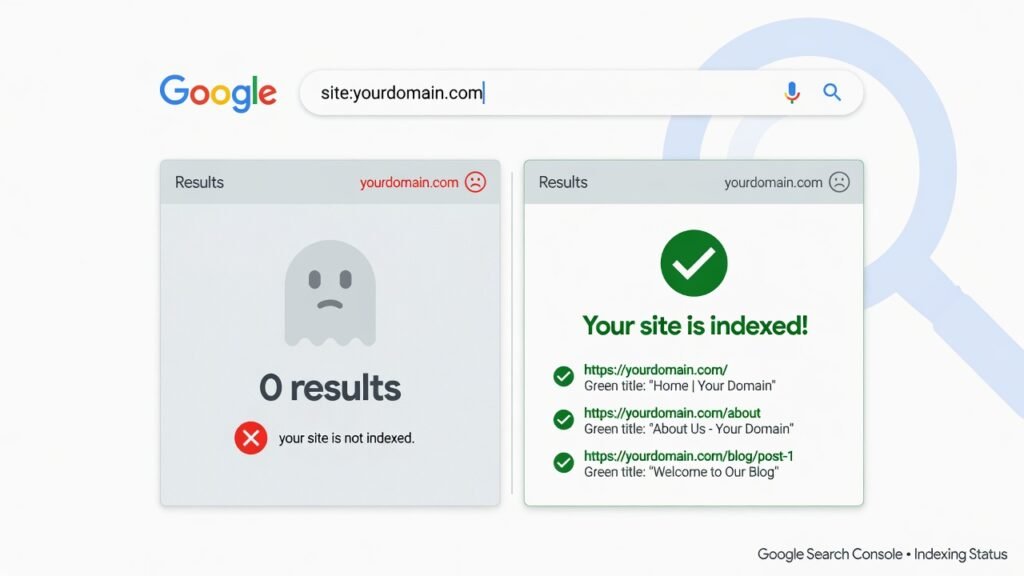
The fastest way to check whether your website is indexed is to use Google’s site: operator.
Open Google and search:
site:yourdomain.com
If no results appear, your site is not indexed. If only some pages appear, you have a partial indexing issue. For a more granular analysis, the Coverage report in Google Search Console shows all indexed pages, excluded pages, and the reasons for exclusion.
Step-by-Step Fixes to Get Your Website on Google
Here is a prioritized action plan you can follow today:
Step 1 — Verify robots.txt allows all important pages to be crawled.
Step 2 — Check for noindex tags across all public pages using a site crawl tool.
Step 3 — Set up Google Search Console and submit your XML sitemap.
Step 4 — Request indexing for your most important pages via the URL Inspection Tool.
Step 5 — Fix all technical errors (404s, redirect chains, broken canonical tags) identified in the GSC Coverage report.
Step 6 — Build your first backlinks from credible, relevant sources to signal trust to Google.
Step 7 — Audit your content for thin, duplicate, or low-quality pages and improve or consolidate them.
Step 8 — Ensure HTTPS is active and all pages redirect correctly from HTTP.
Step 9 — Test JavaScript rendering using the URL Inspection Tool’s “Live Test” feature.
Step 10 — Monitor GSC weekly and respond to any new crawl issues, coverage drops, or manual action notices.
According to Google’s Search Central documentation, the time from submitting a sitemap to full indexing can vary widely based on site authority and crawl budget allocation.
How Long Does It Take to Appear on Google?
For a brand-new website with no backlinks or authority, expect indexing to take anywhere from 4 days to 4 weeks after submitting your sitemap and requesting indexing. Ranking for competitive keywords, however, takes considerably longer — often 3 to 6 months depending on your niche, content quality, and link-building effort.
Established websites that experience a sudden traffic drop after a Google update may recover within a few weeks to a few months once the root cause is addressed and Google re-crawls the corrected site.
When to Hire an SEO Agency
If you have worked through every technical fix on this list and your website is still not appearing on Google, the issue may require a deeper professional audit. An experienced SEO agency can perform a comprehensive technical SEO audit, identify crawling and indexing bottlenecks you may have missed, clean up toxic link profiles, rebuild your content strategy around E-E-A-T principles, and manage the ongoing process of earning rankings in competitive SERPs.
Before engaging any agency, make sure you understand what you are paying for. Read our in-depth breakdown of how much an SEO agency costs to understand typical pricing models, what is included in different service tiers, and how to evaluate whether an agency’s fees align with the results you can realistically expect.
Conclusion
A website that is not showing on Google is not a hopeless situation — it is a fixable one. In most cases, the root cause falls into one of the technical or content categories covered in this guide: a robots.txt misconfiguration, an accidental noindex tag, a missing sitemap, a Google penalty, or a lack of backlink authority. By systematically working through the diagnostic steps and applying the fixes outlined here, you give Google every signal it needs to discover, crawl, index, and rank your website.
Start with the quick wins — check robots.txt, verify noindex tags, submit your sitemap in Google Search Console, and request indexing. Then build a longer-term strategy around content quality, backlink acquisition, and technical health monitoring. Consistent, structured SEO effort is what separates websites that rank reliably from those that remain invisible.
If the process feels overwhelming or your site requires a more advanced recovery strategy, working with a professional SEO team is often the most efficient path to sustainable organic growth.